How to Build an AI Workflow: Chain Tools Like a Pro
Learn how to chain AI tools together into a smooth workflow—from research to writing to editing to images. Covers Zapier, Make, n8n, and practical step-by-step examples.
A well-designed AI workflow reduces manual content production time by 60–75% compared to doing each step individually.
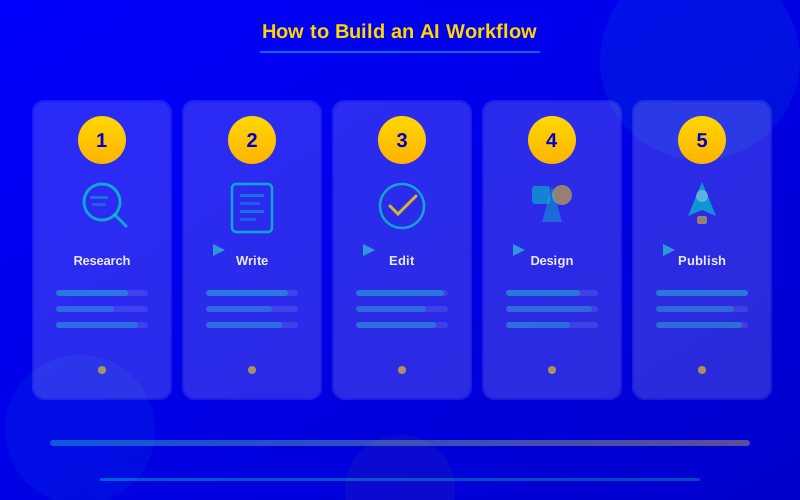
The four-stage workflow pattern—Research → Draft → Edit → Design—works for 90% of content and business tasks.
Zapier connects to 6,000+ apps and lets you trigger AI actions automatically without writing any code.
Open-source n8n gives you full control over your automation data and runs locally for free with unlimited workflows.
Starting with just two connected tools delivers more value than trying to automate everything at once.
Using one AI tool at a time is fine. But the real power comes when you chain them together. Research flows into writing. Writing flows into editing. Editing flows into design. Each step happens automatically, with each tool doing what it does best.
That's an AI workflow. And building one is easier than you think.
This guide shows you exactly how to connect AI tools into a smooth pipeline. We'll cover the core pattern, the best automation platforms, and real examples you can copy today. If you're still picking your first tools, start with our top 5 free AI tools for beginners guide first.
What Is an AI Workflow?
An AI workflow is a series of connected steps where AI tools handle different parts of a task. The output from one tool feeds directly into the next. No manual copy-pasting. No switching between browser tabs.
Think of it like an assembly line. Each station does one thing really well. The product moves down the line and gets better at every stop.
A simple content workflow might look like this: ChatGPT researches a topic and creates an outline. Then it writes a first draft based on that outline. Grammarly cleans up the grammar and readability. Canva generates matching visuals. A scheduling tool posts the finished content.
The Four-Stage Workflow Pattern
Most AI workflows follow the same basic structure. We call it the RDEC pattern: Research, Draft, Edit, Create. This works for blog posts, social media, reports, emails, presentations, and more.
The RDEC pattern handles most content and business workflows. Each stage uses the tool best suited for that task.
The pattern is flexible. Some workflows skip steps. Others add steps. A social media workflow might skip the heavy research phase. A report workflow might add a data analysis step between Research and Draft.
The Three Best Automation Platforms
You need something to connect your AI tools together. These three platforms handle the plumbing so you don't have to copy-paste between apps.
Zapier — Easiest to Use
Zapier connects to over 6,000 apps. It's the simplest automation tool for beginners. You create "Zaps" that trigger when something happens and then run a series of actions.
Example Zap: When a new row appears in Google Sheets → ChatGPT writes a blog draft → Grammarly checks it → the draft saves to Google Docs → Slack sends you a notification.
Zapier's free plan gives you 100 tasks per month with single-step Zaps. The Starter plan ($19.99/month) unlocks multi-step Zaps and 750 tasks.
Make (formerly Integromat) — Most Powerful Visual Builder
Make uses a visual canvas where you drag and drop modules. It handles branching logic, loops, and error handling better than Zapier. It's also cheaper at higher volumes.
Why choose Make: If your workflow needs conditional logic ("if the article is about finance, use this template; otherwise, use that template"), Make handles it more naturally than Zapier.
The free plan gives you 1,000 operations per month. The Core plan ($9/month) bumps that to 10,000.
n8n — Open Source and Free
n8n is the self-hosted option. You run it on your own server. That means unlimited workflows, no per-task pricing, and complete control over your data.
Why choose n8n: Privacy-conscious teams love n8n because your data never leaves your servers. It's also the cheapest option at scale—free forever if you self-host. The trade-off is that setup requires more technical skill.
Platform
Best For
Free Tier
Starting Price
App Connections
Zapier
Beginners
100 tasks/mo
$19.99/mo
6,000+
Make
Complex logic
1,000 ops/mo
$9/mo
1,500+
n8n
Privacy, scale
Unlimited (self-host)
Free / $20/mo cloud
400+
Build Your First Workflow: Step by Step
Let's build a real content workflow using Zapier. This workflow takes a topic and produces a finished blog draft with images. Total setup time: about 20 minutes.
Step 1: Set the trigger. Create a new Zap. Set the trigger to "New Row in Google Sheets." Add a column called "Topic" to your sheet. Every time you add a topic, the workflow starts.
Step 2: Research with ChatGPT. Add a ChatGPT action. Prompt: "Research the topic [Topic] and create a bulleted outline with 5 main sections. Include 3 key statistics with sources." This gives your draft a solid foundation.
Step 3: Write the draft. Add another ChatGPT action. Prompt: "Using this outline, write a 1,200-word blog post. Use short paragraphs. Include a table comparing the top 3 options. Write in a friendly, expert tone." Feed it the outline from Step 2.
Step 4: Check readability. Add a Grammarly Business action (or use a webhook to an editing API). This catches grammar errors and suggests clarity improvements automatically.
Step 5: Save and notify. Add a Google Docs action to save the finished draft. Add a Slack notification that says "New draft ready for review: [Topic]." You're done.
Once this runs a few times, you'll spot improvements. Maybe you want to add a step that generates a featured image. Maybe you want to tweak the writing prompts. That's the beauty of workflows—they get better over time.
Three Real-World Workflow Examples
Here are workflow patterns you can adapt for different use cases.
Social Media Content Pipeline
Google Sheets (content calendar) → ChatGPT (write 5 post variations) → Canva API (generate matching images) → Buffer (schedule posts across platforms). One row in your spreadsheet produces a full week of social content.
Client Report Generator
CRM data export → ChatGPT (analyze trends, write summary) → Google Slides (populate template) → Email (send to client). A monthly report that took 3 hours now takes 15 minutes of review time.
Email Newsletter Workflow
RSS feed (monitor industry news) → ChatGPT (summarize top 5 stories) → Grammarly (polish) → Mailchimp (format and schedule send). Your weekly newsletter practically writes itself. For more AI writing and creation tools to plug into these workflows, see our best AI tools for content creation roundup.
Three proven workflows you can build today. Each follows the same pattern: input → AI processing → output → delivery.
Common Mistakes to Avoid
Automating too much at once. Start with two tools in a simple chain. Get it working reliably before adding more steps. A two-step workflow that runs perfectly beats a ten-step workflow that breaks constantly.
Skipping the review step. Every AI workflow needs a human checkpoint. Don't publish AI-generated content automatically without someone reviewing it first. Build a "pause and review" step into every workflow.
Using the wrong tool for the job. ChatGPT is great at writing but terrible at data analysis. Gemini handles research well but can't edit like Grammarly. Match each step to the tool that's strongest at that specific task.
Not saving your prompts. The prompts inside your workflow are the secret sauce. Write them carefully. Test variations. Save the best ones. A small wording change in your prompt can dramatically change output quality.
Advanced Tips for Power Users
Once your basic workflow is running, these techniques take it to the next level.
Add variables and templates. Instead of hardcoding prompts, use variables: "Write a blog post about {topic} for {audience} in {tone}." This lets one workflow handle dozens of different content types.
Build feedback loops. Track which AI outputs need the most human editing. Use that data to improve your prompts. Over time, your workflow produces better first drafts that need less revision.
Version your workflows. Before making big changes, duplicate your workflow. If the new version breaks, you can roll back instantly. This prevents the frustrating "it was working yesterday" situation.
You don't need a complex setup. Open Zapier, connect ChatGPT to Google Docs, and create a simple two-step Zap. Write a prompt. Test it. Watch your first automated workflow produce real output.
That small win will show you what's possible. From there, add one tool at a time. Within a month, you'll have a personal AI production line that saves you hours every week.
The best workflow is the one you actually use. Start small. Start today.
AI workflowAI automationZapier AIMake automationn8nAI tools chainworkflow automationgenerative AIproductivityAI integration
Frequently Asked Questions
An AI workflow is a sequence of AI tools connected together where the output of one step becomes the input for the next. For example, ChatGPT researches a topic, then drafts an article, then Grammarly edits it, then Canva creates visuals for it. Automation tools like Zapier or Make handle the connections between steps so everything flows without manual copy-pasting.